Download Corporate Calendar 2027 Download

Download Corporate Calendar 2027 Download
 10 minutes
  Every developer has hit this wall: you inherit a repository you've never seen, or you return to code you stopped reading six months ago, and the first hour is spent just *orienting*. What's the entry point? Where does data flow? What is this service actually responsible for? That wasted orientation time used to be unavoidable. In 2026 it isn't.
AI has turned "project comprehension" from a slow, manual digging exercise into an assisted, fast, and repeatable one. This guide shows you practical ways to use AI to understand a project's architecture, code, and intent — instead of reading every file line by line.
Understanding a project is not the same as reading a project. Comprehension means building a mental model:
- **What the system does** — its purpose and the problem it solves.
- **How it's structured** — the modules, the boundaries, the entry points.
- **How data flows** — from request to response, from file to database.
- **What's fragile** — where things break, what's coupled, what's untested.
Reading every line does not build this model faster; it buries it. The signal-to-noise ratio in a big repository is poor — for every 1,000 lines of boilerplate there might be ten lines that define how the whole thing works. AI is good at exactly that: sifting out the noise and surfacing the structure.
AI doesn't replace reading — it accelerates the *orientation* phase. Three capabilities matter most:
1. **Summarisation** — compress a whole file, module, or package into a few lines capturing its responsibility.
2. **Call-graph extraction** — trace how functions and services reference each other, revealing the real architecture.
3. **Query-driven exploration** — ask questions in natural language ("where does the payment flow start?") and get pointed at the relevant code.
The shift is from *you* hunting for the answer to *asking* for it. That's a different skill, and it's worth learning.
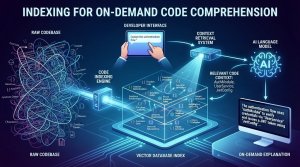
The most reliable way to make a codebase "comprehensible on demand" is to index it so the model can retrieve context. This is Retrieval-Augmented Generation (RAG) applied to source code.
The pipeline:
1. **Chunk** the repository into meaningful pieces (per file, or per function/class).
2. **Embed** each chunk into a vector using an embedding model.
3. **Store** the vectors in a vector database.
4. **Retrieve** the most relevant chunks for every question and feed them to the model.
Here's a minimal example in Python using FastAPI and a vector store:
```python
from fastapi import FastAPI, HTTPException
from openai import OpenAI
import sqlite3, json
app = FastAPI()
client = OpenAI()
DB = "code_vectors.db"
# --- Indexing: embed each file's content and cache ---
def index_file(path: str, content: str):
vector = client.embeddings.create(
model="text-embedding-3-small",
input=content
).data[0].embedding
con = sqlite3.connect(DB)
con.execute(
"INSERT OR REPLACE INTO chunks (path, content, vector) VALUES (?,?,?)",
(path, content, json.dumps(vector))
)
con.commit()
con.close()
# --- Query: find the code relevant to a natural-language question ---
@app.get("/explain")
def explain(question: str):
qvec = client.embeddings.create(
model="text-embedding-3-small",
input=question
).data[0].embedding
con = sqlite3.connect(DB)
rows = con.execute("SELECT path, content, vector FROM chunks").fetchall()
scored = []
for path, content, vector in rows:
vec = json.loads(vector)
scored.append((cosine(qvec, vec), path, content))
scored.sort(reverse=True)
return {"best_path": scored[0][1], "most_relevant_code": scored[0][2]}
def cosine(a, b):
return sum(x * y for x, y in zip(a, b)) / (
(sum(x * x for x in a) ** 0.5) * (sum(y * y for y in b) ** 0.5)
)
```
The idea is simple: instead of reading 50 files to answer one question, you query the index and the model answers from the context that actually matters. This is the single biggest time-saver for onboarding onto an unfamiliar codebase.
With an index in place, comprehension becomes a conversation. The best questions to ask about an unfamiliar project:
- "What is the entry point and how does a request reach the database?"
- "Which modules depend on this one?" (finding coupling)
- "Where would I add a new API endpoint?"
- "What are the biggest risks in this codebase?"
- "What is this file's single responsibility?"
Each question returns a focused answer instead of a wall of code. You build the mental model in minutes rather than hours.
Beyond a single query, you can let an *agent* do the exploration. An agent — an LLM wrapped in a loop that can call tools — can walk the codebase itself:
1. **Search** the repo for symbols, references, and patterns.
2. **Read** relevant files.
3. **Trace** a call path across modules.
4. **Report back** an explanation of how the piece fits together.
```python
tools = [
{
"type": "function",
"function": {
"name": "search_code",
"description": "Find files matching a symbol or pattern.",
"parameters": {
"type": "object",
"properties": {"query": {"type": "string"}},
"required": ["query"]
}
}
},
{
"type": "function",
"function": {
"name": "read_file",
"description": "Read the contents of a file.",
"parameters": {
"type": "object",
"properties": {"path": {"type": "string"}},
"required": ["path"]
}
}
}
]
```
Give the agent `search_code` and `read_file`, set a small goal ("explain how authentication works"), and let it iterate until it can answer — then ask it to write the explanation back to a markdown file. This turns comprehension into an automated task you can re-run as the project evolves.
 The best time to understand a project is while you're already in the code — and the best way to make it stick is to write it down. AI makes this nearly free:
- **Auto-generate a module readme** from the code the first time you look at it.
- **Update documentation** when the agent detects the structure has changed.
- **Produce an architecture overview** diagram description that stays in the repo.
A living architecture markdown, maintained by the agent, means the next person who opens the repo starts from the model instead of from scratch. In a one-person operation, that "next person" is often *you*, six months later — and you'll be grateful you captured it.
The techniques above work for a single repo, but real systems are messier. Two common cases need a slightly different approach.
### Monorepos
In a monorepo, the biggest risk isn't a lack of code — it's the sheer breadth. A single search surfaces files from every service, which is noise. The fix is **scoping your index**:
- Index each service or package into its **own vector store**.
- Teach the agent which store to query based on the question ("where does the billing flow live?" → billing store).
- Keep a **service map** (which folder is which service) as a top-level document the model reads first — it is the fastest way to orient.
The service map is the cheap, high-value artifact. It answers "what is this repo made of?" in one glance, and it's exactly what a fresh set of eyes needs before diving into any one service.
### Microservices
Comprehension across microservices means following a request across a network, not a function call. You need to understand contracts, not just code: what does each service expect as input, and what does it return?
- **Trace one end-to-end flow** (e.g., a checkout) and document the chain of service calls.
- **Capture the contracts** — the request/response shapes at each hop.
- **Identify the coupled points** — where one service can break another.
An AI agent with `search` and `read` tools can walk this chain and produce a single flow diagram that would otherwise take an afternoon to assemble.
The real value of understanding a project isn't a one-off "got it" moment — it's the memory you *keep*. Do it once, then make the model re-derive and maintain it.
- **Onboarding docs** — a per-project markdown that answers the standard questions ("entry point", "data flow", "what's risky"). A new teammate (or you, months later) reads 200 words instead of an hour of digging.
- **Client-facing summaries** — for a managed-services provider, this is powerful: the same comprehension model that walks your own codebase can summarise *a client's* environment into a readable "what your system looks like" brief. That's not just internal, it's a service.
- **Auto-refresh** — re-run the comprehension agent periodically and let it flag when the architecture doc has drifted from reality.
For a small operation, a hosted or self-hosted retrieval stack that keeps a reading of each environment means you never start a job cold. Every project you touch already has a map, waiting for you.
It's tempting to assume code comprehension needs a big cloud API. For many scenarios **self-hosting is the smarter play**, and on modest hardware too.
- **Privacy** — your proprietary source code stays on your infrastructure, not someone else's API. This is a genuine concern for commercial code.
- **Cost** — a local model is a fixed cost, not a per-token bill that grows as you index more of the repo.
- **Latency** — no network round trip; exploration feels instant.
- **Control** — you choose the model and the quotas.
Open-source models via **Ollama, llama.cpp, or vLLM** can run code-embedding and Q&A on a single good GPU — or even CPU for smaller projects. For a small business, the difference between "cloud-only" and "self-hosted option" is the difference between a recurring subscription and owning the tool.
**The pragmatic approach:** use an API to prove the concept, then move the code you interact with most to a self-hosted model once you know the scale. Code comprehension is a great use case for this, because the embeddings are cheap to compute and the retrieval is fast.
- **Indexing too much.** You don't need to embed every generated or third-party file. Filter to the code you actually own.
- **Stale indexes.** Re-index when the repo changes — an outdated index gives confidently wrong answers.
- **Losing the file map.** The model needs to know *which* file a chunk came from; always store the path alongside the content.
- **No context of your domain.** AI understands code, but not your business rules. Pair the model's explanation with your own judgment.
- **Treating it as a replacement for reading.** Use AI to orient and shortlist; still read the critical files yourself before making changes.
If you want to bring AI-driven comprehension into your workflow, here's a practical roadmap:
1. **Pick one repo** — ideally one you need to understand soon.
2. **Index the core files** (skip generated and vendored code) into a vector store.
3. **Ask five questions** about it and see how well the retrieval works.
4. **Add a read + search agent** to automate walking the code for bigger questions.
5. **Generate an architecture markdown** and keep it in the repo.
6. **Re-index on changes** and keep the answers honest.
7. **Consider a self-hosted model** once the workflow is proven.
You don't need to become an AI researcher to do this. You need a code index, the ability to ask focused questions, and the discipline to capture what you learn. The combination turns the most dreaded part of touching a new project — the first hour of confusion — into a quick, structured dig.
The best thing about all of this is that it scales in your favour. A comprehension assistant that works on one repo works identically on ten. The index, the agent, and the living documentation are all repeatable, so the more projects you touch, the more the upfront cost of each one drops. That's the quiet edge: the person who understand a codebase in ten minutes instead of an hour is going to move faster on every task that follows.


https://www.cbs.com.sg/efficient-project-comprehension-with-ai-understand-any-codebase-fast/
copy

